The GUI¶
A form over bin/crowdsim. Every run is a child process of the same CLI, with the same gates, writing the
same out/ directory — so a run started from a terminal and a run started from this page are the same kind
of object and land in the same history.
What it adds over the CLI: you can see what a peak means per class before you press the button, whether the target is allowlisted before you press it, the exact command that is about to run, the log while it happens, and the archive with a knee plot.
What it is not: a second implementation of the safety rules, a scheduler, or a store of results.
Start here¶
Five steps. Every command below was run to write this page; the screenshots come from those runs.
1. Start it¶
Pick whichever you already have. Both end up on the same page.
# from a checkout (needs node ≥ 20 once, to build the page)
npm install && npm run gui:build
crowdsim serve                                    # http://127.0.0.1:8787
# from the container image — nothing to install, nothing to build
git clone https://github.com/hiway-media/crowdsim && cd crowdsim
cp .env.example .env                              # put a token in it: openssl rand -hex 16
docker compose up                                 # http://127.0.0.1:8787
You should see three lines naming the profile directory, the output directory and the allowlist:
crowdsim GUI  http://127.0.0.1:8787
  profiles  /tmp/crowdsim-demo/profiles
  output    /tmp/crowdsim-demo/out
  allowlist 127.0.0.1
If allowlist says (unset …), stop and read step 2 — nothing will run
until a host is allowed.
If the page says "The UI has not been built yet", you skipped npm run gui:build. The API works
regardless: curl http://127.0.0.1:8787/api/env.
2. Allowlist the target¶
crowdsim refuses to generate load at a host nobody named. There is no default, in the CLI, the image, or here. Either set it in the environment of the server:
…or put it in the profile, which is the better place because it travels with the test:
The page tells you which way it went, top right, and whether the chosen target passes:
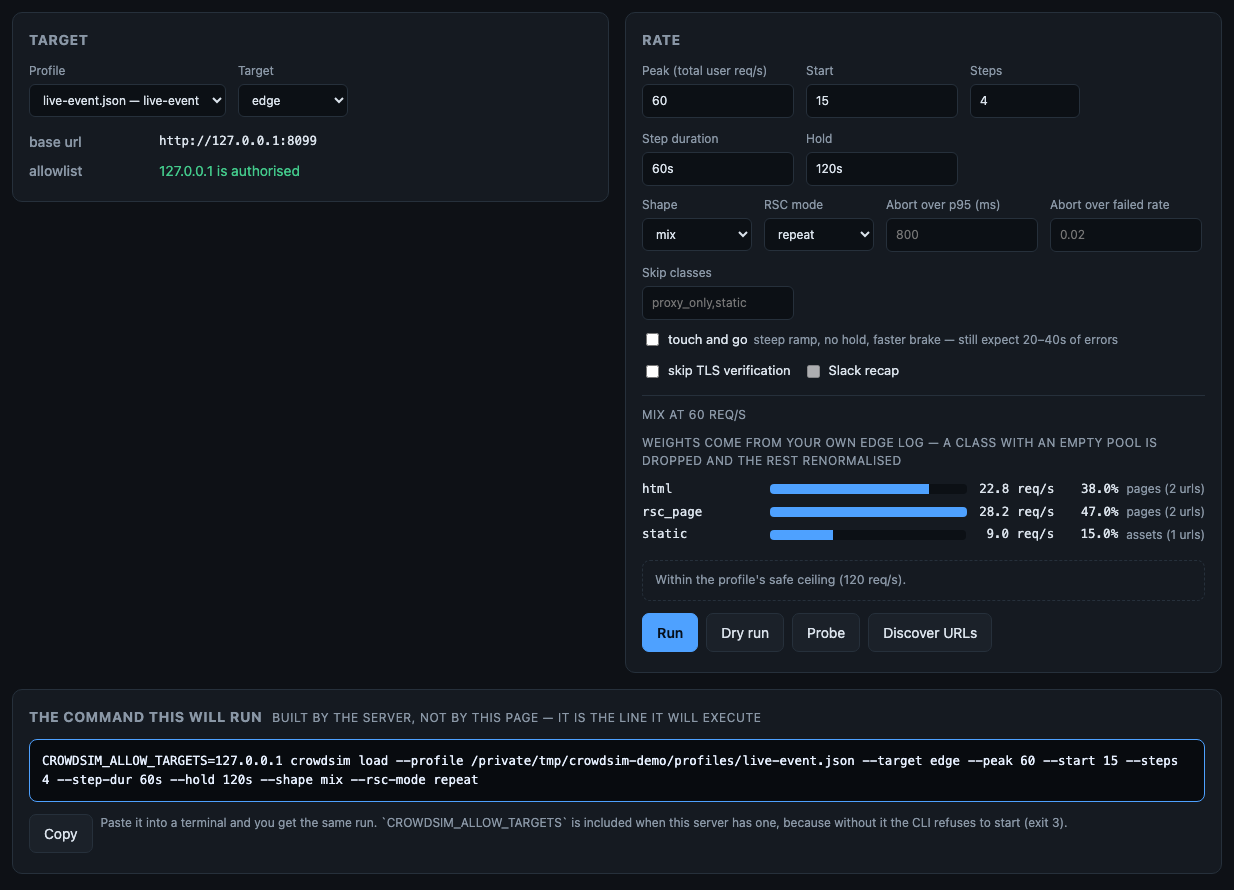
Read the two things that matter before anything else:
allowlist—127.0.0.1 is authorisedin green, or a red line saying the run will be refused with exit 3. It is computed here from the same rules the CLI applies, so it is not a guess.- the mix bars — what your peak means per class.
60 req/sis not 60 page loads: this profile turns it into 22.8 html + 28.2 framework navigations + 9 assets, using the weights you measured on your own edge log (crowdsim weightscounts them — see the CLI reference). This is the number people get wrong when they reason about a peak.
The warm-up, in the same card. Warm-up (a duration, blank means off) and Warm-up rate run the
generator once before the measured run and throw those numbers away. The first seconds of any run measure an
empty cache, a cold pool and an unJITted app, and they sit inside the p95 you are about to quote — and the
page is where the people least likely to know that are launching runs. A blank rate means the ramp's own
starting rate, which is what the driver does with it, and the field says so.
A warm-up is load, so the safe ceiling applies to it: a run whose peak is inside the ceiling and whose
warm-up is above it needs the same override, and the page says which of the two rates is over before you
click. The driver re-runs the same gate with the warm-up rate in place of the peak, so the refusal is exit 3
from bin/crowdsim, not a second opinion from the server.
3. Read the command before you agree to it¶
Under the form, always visible, is the line the server will execute:

This is not a description of the run assembled by the page for your benefit. The page sends the form to
POST /api/preview, and the server answers using the same function that builds the argv it spawns — so
the preview cannot drift into describing a different run from the one that happens. Paste it into a terminal
and you get the same run; CROWDSIM_ALLOW_TARGETS is included because without it the CLI exits 3.
It also validates as you type: a peak of lots comes back as peak: peak must be an integer between 1 and
100000 here, before the button is ever pressed.
4. Preflight: two questions worth answering first¶
Probe asks whether the layer you think you are measuring actually answered, and what a page weighs. It is one request:
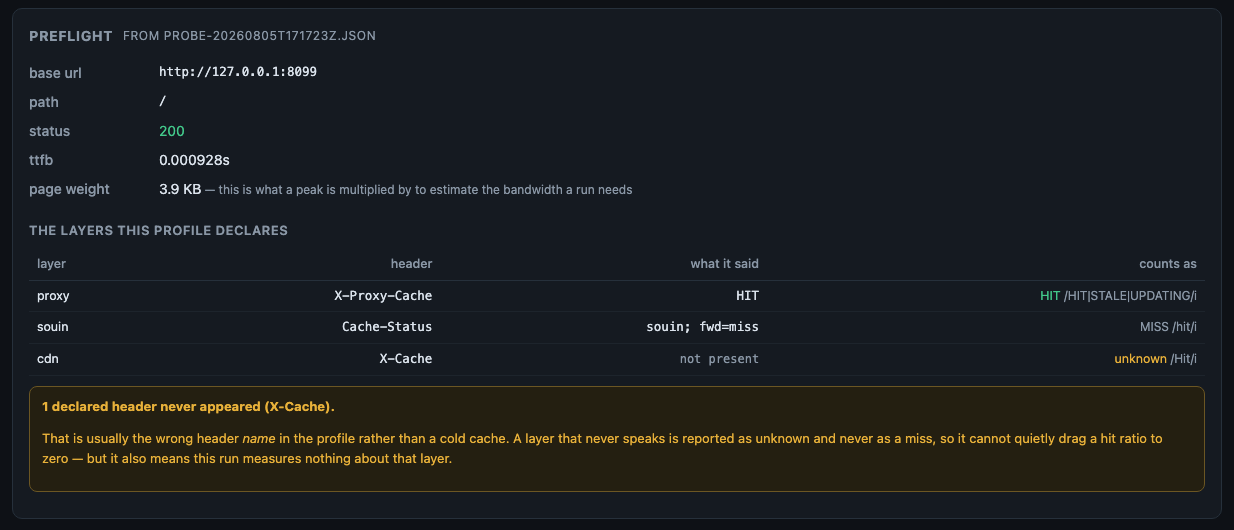
The layer table has three possible answers, and the third one is the point:
| counts as | means | what to do |
|---|---|---|
| HIT (green) | the header was there and matched the profile's hit pattern |
nothing |
| MISS | the header was there and did not match | a cold cache, or a genuinely uncacheable response |
| unknown (amber) | the header never appeared at all | usually the wrong header name in your profile — not a cold cache |
A layer that never speaks is reported as unknown and never as a miss, because a hit ratio fed only zeroes reads as "the cache is broken" when the truth is "this profile is looking at a header this layer does not send". The amber banner names the header so you can fix the profile instead of the cache.
page weight is the number a peak gets multiplied by. 45 KB at 380 req/s is ~17.6 MB/s (~141 Mbit/s)
sustained — which is how load can warn you before a run comes back generator_ok: false.
Discover URLs turns the sitemap into the pool a run will fire, and shows what it would write:

If verified says no, nobody has asked those paths whether they render. A 404 is cheap for the app tier
(or is itself rendered) and a 3xx measures a redirect: either one in a pool produces a flattering number for
load that never reached the renderer. When verification did run, the dropped paths are listed with their
reason and status.
Both tables are read from the files the driver wrote — out/probe-<run>.json and out/discover-<run>.json —
not scraped from the terminal output. That is deliberate: the same file is what load reads back, so the
table cannot disagree with what the next run acts on.
5. Run it, and watch¶
Press Run. The log streams live, and Stop appears:
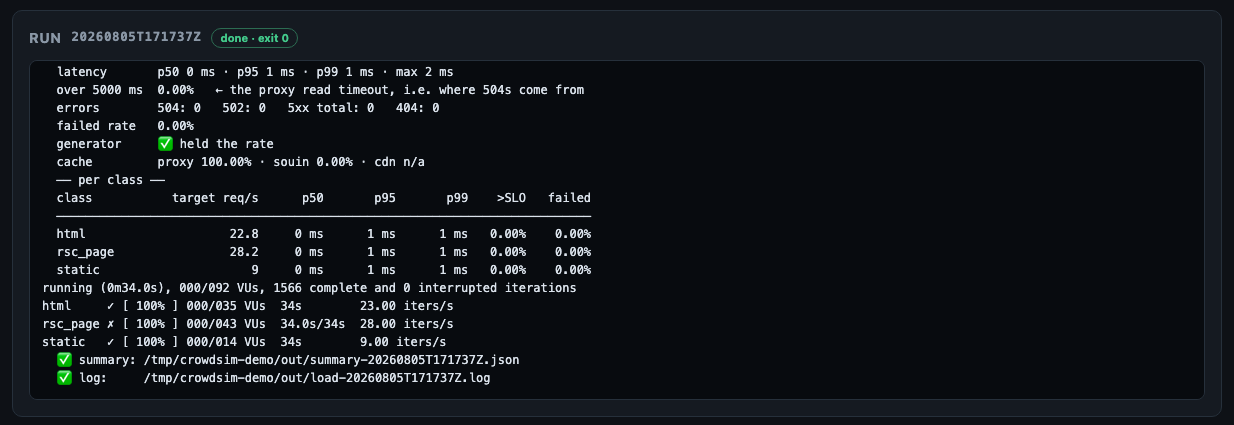
Stop sends SIGINT, so k6 winds down and still writes the summary — a killed run is a window burned for
no data. SIGKILL follows only after 10 seconds, and the log says so when it happens.
If the page loses the live log it says so, rather than going quiet:
Lost the live log, reconnecting… Whether the run is still going is not known from here until it comes back.
and, once the server has stopped answering altogether, that the driver's own log and summary in out/ are
where the truth is. While the connection is down the run's status reads not known instead of continuing
to assert running: the state of the connection and the state of the run are two different things, and only
one of them is visible from here. A reconnect replaces the log with the server's copy rather than appending
a second one.
When it ends you get the verdict, in the order that keeps you honest:
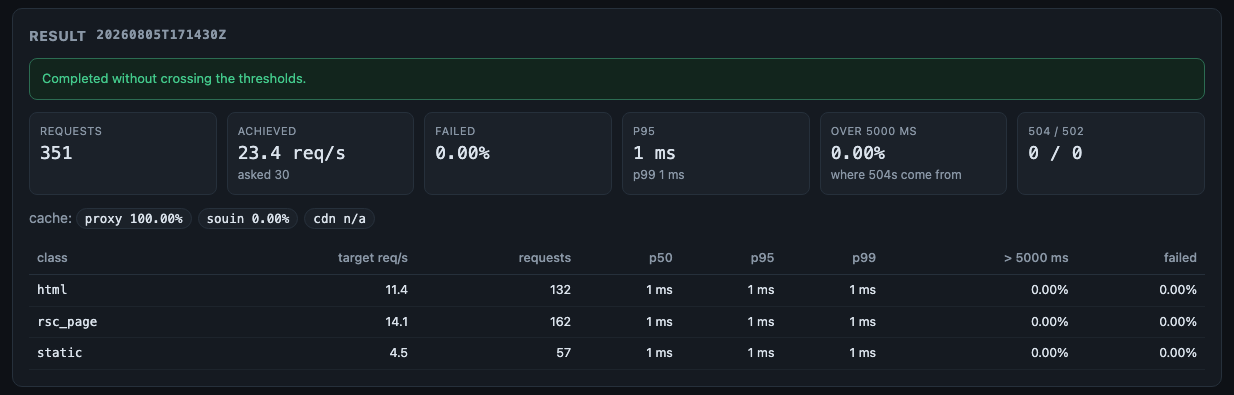
The blue banner is the knee: the highest rate this run measured the system surviving, and the rate at which it stopped — with the two caveats that never survive retyping attached to it, that a swept rate is not a sustained one and that a knee at a synthetic pool is harsher than one at real traffic. When the run cannot support a knee, that banner says so instead, with the reason and what to change: a quiet absence would be read as no knee found, after which somebody quotes the requested peak — the one rate nobody measured.
If the brake stopped the run, the amber banner says so as the intended outcome — and names the class and the
threshold that crossed, because a class can hold itself to its own
SLO and "you found the knee" no longer says where. It comes from
the summary's aborted_by and nowhere else: runs archived before that field existed show the verdict without
the detail, rather than a culprit reconstructed from the profile.
Two buttons, top right of the result. Report (.md) writes the run as markdown for the place the result
actually goes: a ticket, a PR, an incident timeline. Report with charts (.html) writes the same run
drawn — the ramp as a curve with the SLO and the knee band on it, p95 per
class against each class's own limit, the cache per layer — as one self-contained file that opens offline and
prints to PDF. Both are produced by crowdsim report on the server, in the same files under out/ that the
CLI writes, and not by a second renderer here: the caveats are the whole point of those documents, and two
renderers eventually disagree about what a run means. What travels with the numbers is what they are worth.
The refusals travel too. A run the generator could not sustain gets no latency curve in the page — only the chart that shows why it is invalid — for the same reason the banner above tells you to discard it.
The archive, and the delta¶
Those two buttons draw one run. Two more draw what the archive says, and both are the CLI's pages handed through in exactly the same way:
- Trend over time (drawn), above the run list, is
crowdsim history --html: the knee per run, with the requested and delivered rates told apart. Does the knee move is the only question the archive exists to answer, and until 1.39.0 it could not leave the page. - Delta, drawn, in a comparison, is
crowdsim compare a b --html: the delta as a delta, not two absolute curves to subtract by eye.
Both open in a new tab rather than downloading. The run report is a file because it goes into a ticket; these two are questions somebody asks on screen while deciding.
Neither is offered when there is nothing to draw, and the page says why instead of hiding a control:
- one run in the archive is not a trend — through a single point it is a straight line, which is the same refusal the knee makes from one completed step;
- a comparison
comparerefused gets no drawing. The reasons above it are the answer; two different experiments on one pair of axes would not be. The server refuses it too (422), withcompare's own text.
The set of drawn pages is not tracked by hand any more. gui/server/lib/drawn-pages.js lists them
exhaustively and tests/gui/drawn-pages.test.js asks bin/crowdsim which subcommands declare --html, so
a fourth drawn page fails the suite instead of quietly not being offered — which is what happened to these
two, and to six summary blocks before them.
Reload the page and it is still there. The server keeps the run list, and the page asks for it on load. A run
in the archive also has an address of its own — #history=<run-id> opens that run's result, the same way
#history=<run-a>,<run-b> opens a comparison — which is how you hand somebody a result, report button
included, instead of telling them which row to click.
Then read Reading results. It is short, and it is the page that stops you quoting a
number that means nothing. The first field is generator_ok: if it is false, discard the run.
The three panels¶
New run¶
- Profile — only profiles that validate are offered. Switching profile clears the last result (a result belongs to the profile it came from) and disarms the safe-peak override.
- Target — shows
base_url, anyHostoverride, the bypass, the classes it skips, and the allowlist verdict. - Rate — peak, start, steps, step duration, hold, shape, rsc mode, SLO overrides, skip list, the warm-up (a duration, blank means off, and a rate that defaults to the ramp's own starting rate), and three switches: touch-and-go, skip TLS verification, Slack recap (greyed out unless a webhook is configured).
- Buttons — Run · Dry run (composes everything, sends no traffic) · Probe · Discover URLs. Stop appears while a run is in flight.
- On the result — Report (.md) to paste, and Report with charts (.html) to attach. Both spawn
crowdsim report; neither is rendered by the page.
This machine¶
Under the run form: the version of the server serving the page, k6, where runs are written, the allowlist,
and what doctor --bench measured this host doing. The generator's own limits are the most common reason a
run is invalid, and this is the page that starts runs — all of it used to live in a terminal.
The measured ceiling keeps the caveat the artefact carries. A benchmark taken inside a container in a VM is shown as exactly that, not as a ceiling: it describes the VM's own network, which is the layer that throttles a run against a real target. The page does not offer to run the benchmark for you — it generates load, and a report that starts generating traffic on its own is not a report.
The version is in the header too. A page served by a stale server is indistinguishable from a current one, which is how a three-release-old server survived an audit.
Profiles¶
A JSON editor with live validation, and a summary of what the profile means: the mix as shares, the targets, the safe peak, the allowlist, the brake, the read timeout, the cache layers.
A raw editor on purpose: a profile is a small, heavily commented document that people diff in git, and a
generated form would strip the _comment keys that make it readable. What the GUI adds is telling you what is
wrong while you type — errors (would fail, or be meaningless) and warnings (would run, but not mean what you
think):
classes[3]            pool "static" is empty: this class will be dropped and the mix renormalised
slo.guillotine_ms     the read timeout is below the p95 SLO: the brake would abort only after real
                      users are already getting 504s
safety.allow_hosts    an allowlist of "*" is not an allowlist
example.json is read-only — it is the shipped documentation. Use Save as…. If profiles/ is mounted
read-only, the page still lists, validates and runs profiles, and explains that it cannot save them.
History¶
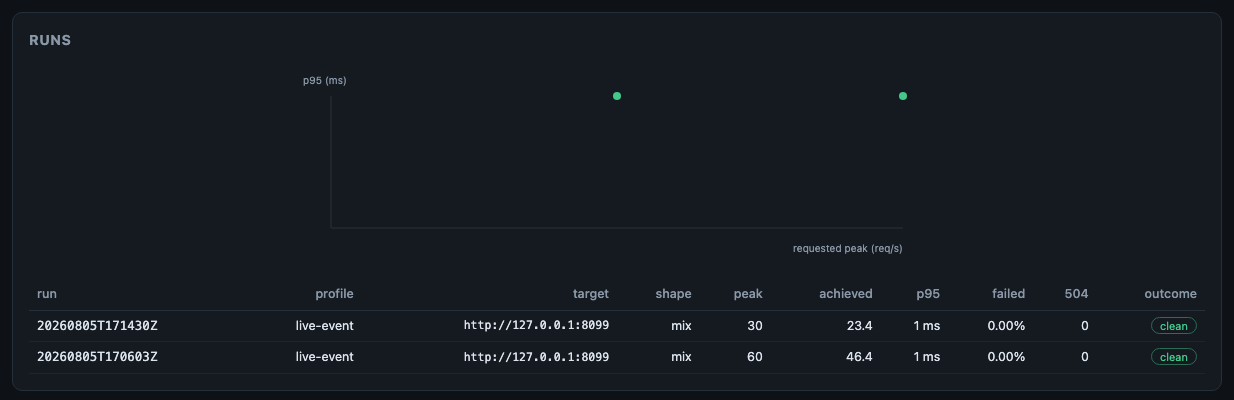
out/history.tsv and the summaries, read from disk — including runs started from the command line. Runs with
generator_ok: false are struck through and drawn hollow in the plot rather than plotted next to valid ones.
The knee column is the only pair of numbers here that was measured rather than requested. 3 → 4 means
clean at 3 req/s and crossed at 4; ≥ 2 means the run stayed clean at every rate it reached, so the knee is
above its peak and this run did not find it; a dash means the run could not support a knee at all, with the
reason on hover. A run archived before per-step numbers existed shows nothing — which is not the same as a
knee of zero, and is why the column is empty rather than 0.
Two things are drawn on the same axes and they do not mean the same thing. A dot is one run: its requested peak against its p95 over the whole ramp, i.e. an average across every rate it passed through. The line is the selected run's own per-step shape — that is the real curve, and it comes from a single run. Hollow points on the line are partial steps: the run ended inside them.
Selecting a run shows the full result and a comparison against previous runs at the same profile, target and shape, labelled so nobody quotes the absolutes: deltas are the honest part.
Tick two runs and press Compare for the delta between exactly those two — overall, per class, and per cache layer:
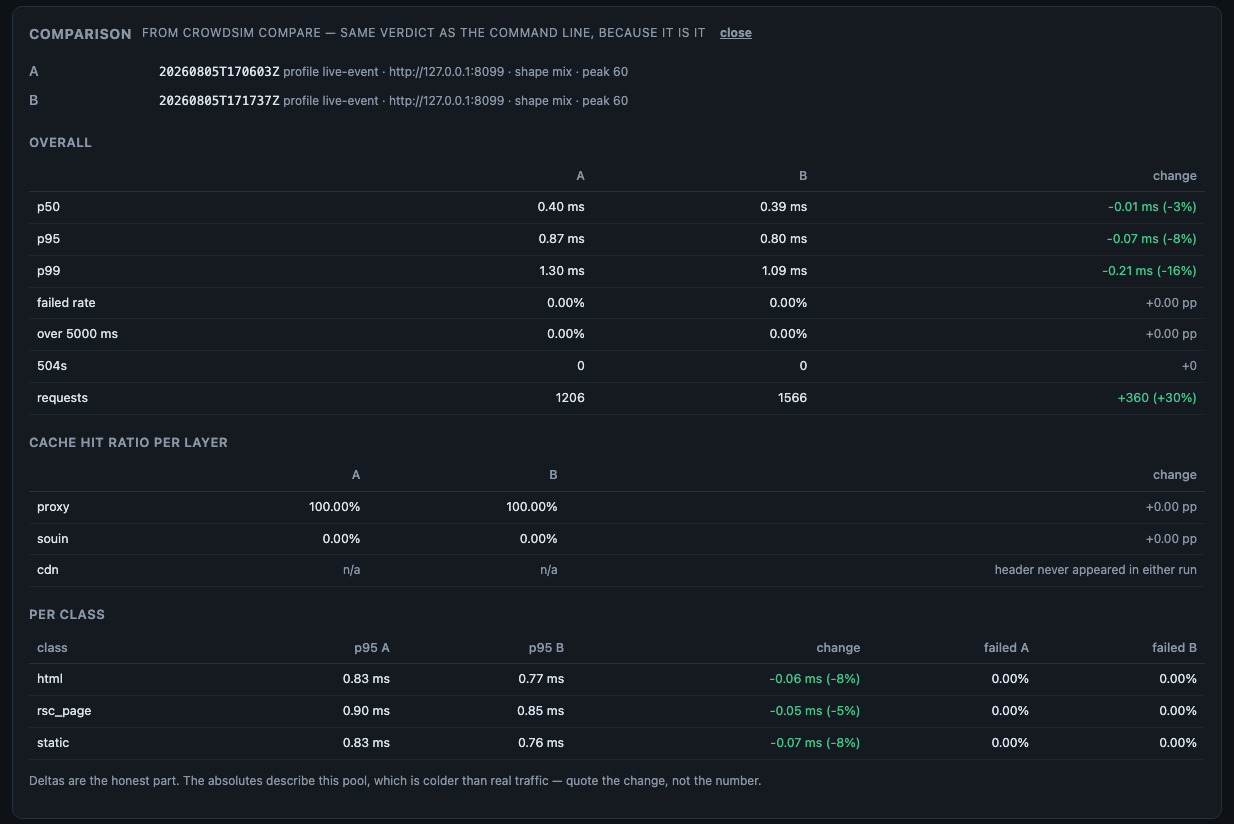
Nothing on that card is decided by the page. It calls crowdsim compare --json, which computes the verdict
once for both interfaces — so what you read here is what a terminal would print, down to the wording. That
matters most when the answer is no:
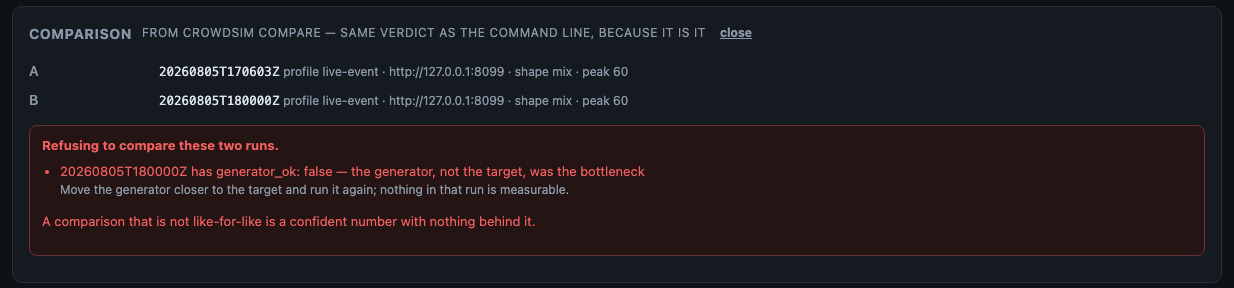
Two runs at different URL pools are two different experiments, and a run with generator_ok: false has no
numbers at all. The page refuses both, as loudly as it would have shown a result — because a delta between
two different experiments looks exactly like an answer.
A comparison has an address: #history=<run-a>,<run-b>. Paste that link into the incident doc and whoever
opens it sees the same two runs, with the same verdict.
Each tab is a link — #run, #profiles, #history — so a reload keeps you where you were.
What happens if the server dies mid-run¶
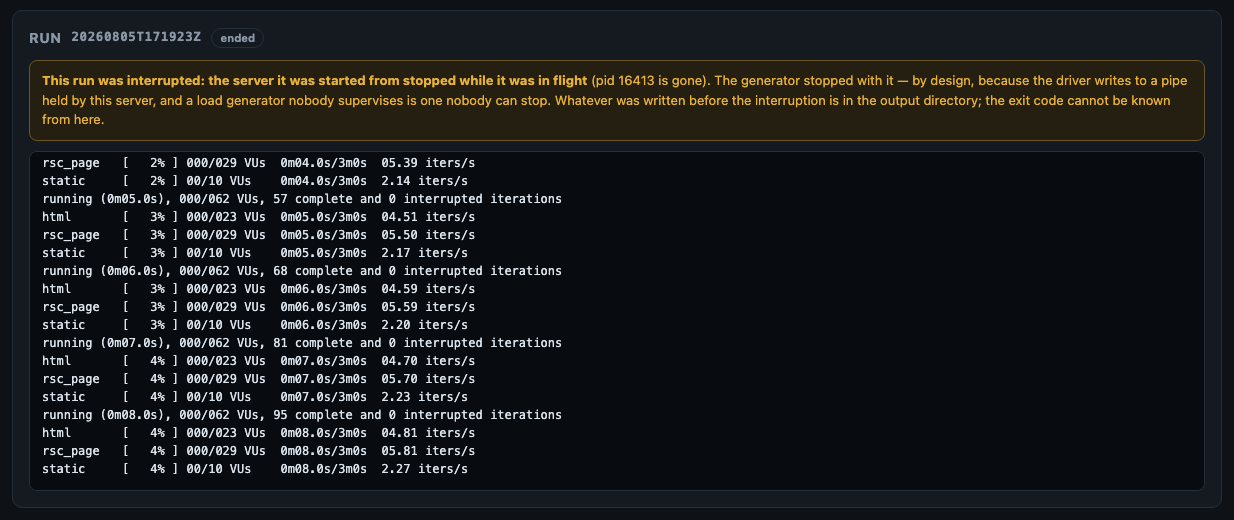
This was measured, not assumed, because the answer is not what it looks like.
Kill the GUI server and the generator dies with it, within about two seconds. The driver writes to a pipe
held by the server; when the read end disappears the next write fails, and set -eo pipefail takes the run
down. k6 goes with it. That is a fail-safe worth keeping — a load generator whose supervisor is gone is
exactly the one nobody can see and nobody can stop — so the child process is deliberately not detached.
What the page must not do is pretend nothing happened. The server records one line of state in
out/gui-run.json, and on startup it checks it:
| On startup | The page says |
|---|---|
| the recorded pid is gone (the normal case) | the run was interrupted, the generator stopped with the server, the archive is in out/, and the exit code cannot be known from here |
| the recorded pid is alive (a supervisor that restarted only this process) | the run is adopted: it is listed, it still counts for one-run-at-a-time, Stop still works by pid, and the log comes from the driver's own run log file |
| a stop cannot be delivered | the exact command to do it by hand: kill -INT <pid> |
An adopted run never invents an exit code. This server was not there when it ended, so it says so and points at the summary.
What the result view shows¶
The result card reads the summary in the order reading a result prescribes, and since 1.34.0 that includes the blocks it had been silently skipping:
- Failure mode first — which class, which status code, what share. A run that completed without crossing its thresholds while serving 32% 404s on one class used to read on this page as a pass, which is the same wrong answer 1.29.0 fixed in the panel and the reports.
- Why the rate was not held, when it was not: the generator (discard) or the target (a finding).
- Requested → delivered, with the fan-out between them.
- What answered, and with what — one bar per class, split by outcome. p95 per class was the only
thing a class did on this page, so a run serving 474 × 404 on two classes showed a healthy card. The
band arithmetic is the same function the drawn report uses (
outcomeBandsink6/lib/failure.js), becausecs_5xxcounts the 502s and 504s too in two places is two places to get it wrong — and the page and the report end up side by side in the same conversation. A class that never ran has no row; a run where nothing failed has none at all. - The knee, refusals included — and the plot's x-axis now says which rate it is drawing. It maps the requested rate, because that is the axis every step shares; an unlabelled axis on a mix with a fan-out of 1.25 shows a knee at 60 while the target was taking 76, which is the wrong answer 1.29.0 removed from the text, moved onto the chart. Hovering the axis gives the pair and the fan-out; a run whose delivered rate was refused says so instead of pretending the two are equal.
concurrency, think_time, allocation, signup, auth and server_side are deliberately not
shown, each for a reason written down in gui/ui/src/lib/summary-blocks.js. That file is exhaustive over
what the generator produces, and tests/ui/summary-blocks.test.js fails when a new block belongs to
neither list — six of them had accumulated because nothing noticed.
Two follow-up runs, and a server-side series¶
Since 1.34.0 the run form can express the flags added in 1.30.0 and 1.31.0. Two of them are not ordinary form fields: either one starts a further run when this one finishes.
| Control | What it does |
|---|---|
| recalibrate if the first step dies | The ramp started above capacity, so the run measured nothing. Retry from half the rate, up to three attempts. |
| certify a swept knee | The knee was crossed on the way up. Follow it with one hold at that rate, as a separate run. |
| Server-side series + label | A file on the machine this server runs on, read against the run's own steps. |
The page says so, and only when one of them is on:
Either of these can start a FURTHER run when this one finishes. Each attempt is its own run with its own id and history row, and goes through both gates again — the safe-peak override is never inherited.
That last clause is the important one. Sweeping past the safe peak takes the override typed for this run; holding that rate for minutes is a larger authorisation, so the driver re-evaluates the gate and the certification is refused rather than inheriting a decision somebody took once. The two checkboxes are mutually exclusive because the driver takes the first — a page that let both be ticked would describe a run that does not happen.
The series is a path, never a URL. crowdsim does not fetch server-side metrics — that is
a decision, not a gap — so there is nothing here to point at a metrics backend. The field
takes a relative path under the server's working directory: no absolute root and no .., because a
form field that could name any file on the server is a file-read primitive with a text box in front of
it. The label must look like a metric name, since it is rendered.
Safety¶
The gates live in the CLI and the GUI cannot weaken them. Concretely:
| Property | How |
|---|---|
| Gates not re-implemented | Every run is bin/crowdsim as a child process; refusals surface with the driver's own exit code (3 = a gate) |
| No argument smuggling | Only known flags with validated values are composed — integers in range, durations matching 30s/2m/500ms, shape and rsc mode as closed sets, a base URL that must be http(s) without credentials, a target name that must start alphanumeric. No shell, no passthrough. |
| The preview is display only | It renders the argv the server would spawn; nothing executes a rendered string, and the endpoint starts no process |
| One run at a time | A second Run is a 409 naming the run already in flight — and it survives a restart, so a rebuild cannot become two generators |
| Graceful stop | Stop sends SIGINT, so k6 winds down and still writes the summary. SIGKILL only after 10 s, and it says so. |
| Loopback by default | Any other bind address requires CROWDSIM_GUI_TOKEN; the server exits 3 without it |
| No secret echo | /api/env reports whether a Slack webhook is configured, never its value |
The safe-peak override¶
Above the profile's safe_peak_rps the run panel turns into a block that states what will happen, and asks
for two deliberate acts for that run: the checkbox, and the profile's name typed by hand.
┌ DANGER ──────────────────────────────────────────────────────────────┐
│ 500 req/s is above this profile's safe ceiling of 150 req/s.         │
│ Past this point the run is expected to serve 5xx to real users of    │
│ www.example.test, and to degrade any co-tenant on the same nodes.    │
│ Agree a window, tell whoever watches the uptime alerts, and be ready │
│ to stop. Then type the profile name to confirm.                     │
│   ☐ I know this breaks production      Profile name [            ]  │
└──────────────────────────────────────────────────────────────────────┘
The preview shows the line with --i-know-this-breaks-production as soon as the checkbox is ticked, and
says so: you are reading it armed. Reading it buys nothing — starting it still requires the typed phrase.
Nothing about the override is remembered: the confirmation is not stored, not defaulted, and is stripped from
the run record. Without both acts, the API answers 400 naming the confirm field.
A warm-up counts as load. The same block appears when the warm-up rate is above the ceiling and the peak
is not, and it names the warm-up rather than the peak — being told a 60 req/s run was refused sends nobody to
look at the warm-up field. bin/crowdsim enforces it: it re-runs the peak gate with the warm-up rate in
place of the peak, so the GUI adds nothing to that decision and cannot take anything away from it.
Why it exists at all, rather than being CLI-only: somebody who needs to reach the knee will do it either way, and pushing them to hand-assemble a command line buys a copy-paste window — the wrong rate against the wrong target — not consent. The friction stays where it is useful: an explicit act that names the thing being risked.
Configuration¶
| Variable | Default | Notes |
|---|---|---|
CROWDSIM_GUI_PORT |
8787 |
Or crowdsim serve --port |
CROWDSIM_GUI_BIND |
127.0.0.1 |
Or --bind. Off loopback requires a token. |
CROWDSIM_GUI_TOKEN |
unset | Bearer token on every /api route |
CROWDSIM_PROFILES |
./profiles |
The directory the editor reads and writes |
CROWDSIM_SERIES_DIR |
none | The directory a handed-in server-side series may be read from. Unset means the page reads no series at all — there is deliberately no default, because falling back to the working directory is what let a symlink under it reach anything. The path is resolved and contained, so a symlink leaving the directory is refused, which a pattern check cannot see. Mount it read-only in the container |
CROWDSIM_OUT |
./out |
Shared with the CLI — this is the point |
CROWDSIM_ALLOW_TARGETS |
unset | Inherited by every run it starts |
CROWDSIM_BIN |
resolved, see below | Which driver to spawn |
In a container the bind must be 0.0.0.0 (loopback there means "reachable by nobody") and the reachability
decision moves to the port publication: see Docker §4.
Which driver the GUI spawns¶
Every run is a child process of bin/crowdsim, so this is the one thing the server must not be wrong about.
Started with crowdsim serve, there is nothing to resolve: the driver exports its own absolute path as
CROWDSIM_BIN, so the page spawns the script you invoked — not another copy of it that happens to be
found first. That matters when two versions are installed side by side.
Started directly (node gui/server/index.js), it looks in order:
CROWDSIM_BIN— an explicit answer, and whatcrowdsim servesets. If it is set and not executable the server refuses to start and says so; it does not fall back, because silently spawning a different driver from the one it was told to is worse than refusing.$CROWDSIM_ROOT/bin/crowdsim— the variable the container sets, and the one people reach for.- the checkout the server is running from —
gui/server/../../bin/crowdsim. crowdsimonPATH— an installed driver, whatever the layout around it.
If none of them is executable the server exits 2 naming CROWDSIM_BIN and listing where it looked. It
does not serve a page: a GUI that cannot spawn the driver has no job, and a page that accepts every click
and fails each one is worse than no page. The driver it resolved is printed at startup, next to the
profiles and the output directory, so docker logs can answer what is this page actually running?
crowdsim GUI  http://0.0.0.0:8787
  driver    /usr/local/bin/crowdsim  (from CROWDSIM_BIN)
  profiles  /profiles
  output    /out
This was a real bug in the published image, from the release that first shipped it (1.2.0) until
1.19.2 — thirty releases. The image puts the
driver in /usr/local/bin/crowdsim and the rest of the tool in /crowdsim; the server derived its default
from its own location — /crowdsim/gui/server/../../bin/crowdsim — and that file does not exist there. The
page started, said nothing, and every run failed with crowdsim could not be started: spawn
/crowdsim/bin/crowdsim ENOENT after the click. Rule 2 above is what this documentation had always
claimed, which is exactly why the gap survived: CROWDSIM_ROOT=/crowdsim looked like it covered it. It was
found by somebody running the container and working around it in a Nomad job — not by any test here, which
is why tests/image/smoke.sh now launches a --dry-run through the API and fails when the run cannot
start.
HTTP API¶
Same-origin, JSON. Useful if you want to drive it from something else — though for automation the CLI is the better interface: it is the thing the API calls anyway.
| Method | Path | Purpose |
|---|---|---|
GET |
/api/env |
k6 version, directories, allowlist, whether Slack is configured, valid shapes/modes |
GET |
/api/profiles |
List, with validation state per profile |
GET |
/api/profiles/:name |
Raw text, parsed object, validation |
PUT |
/api/profiles/:name |
Save ({raw, force}); 422 with details if it has errors, 409 if the directory is read-only |
DELETE |
/api/profiles/:name |
Delete (never example.json) |
POST |
/api/validate |
Validate {raw} without touching disk |
POST |
/api/preview |
The argv and pasteable command for a request, without starting anything |
POST |
/api/runs |
Start {kind: load\|probe\|discover, profile, …}; 201 with the run record, 409 if one is in flight |
GET |
/api/runs |
Every run this server knows about, newest first, plus the active one |
GET |
/api/runs/:id |
One run, with its log, summary and preflight artefacts |
GET |
/api/runs/:id/stream |
Server-sent events: line, then end |
POST |
/api/runs/:id/stop |
Graceful stop |
GET |
/api/history |
out/history.tsv, newest first |
GET |
/api/history/:runId |
Summary, history row, comparable runs, run log |
GET |
/api/history/:runId/report[?format=md\|html] |
The run as markdown (default) or as a page with charts, written by crowdsim report and served as a file. Any other format is a 400 |
GET |
/api/history/trend[?last=&target=&profile=] |
The knee over time, drawn by crowdsim history --html. The filters are the ones history accepts; anything else is a 400 |
GET |
/api/compare/page?a=&b= |
The delta between two runs, drawn by crowdsim compare --html. 422 with compare's own reason when it refuses the pair |
GET |
/api/compare?a=&b= |
The delta between two runs, from crowdsim compare --json. 422 with refused[] when they are not comparable |
# what would this run do?
curl -s -X POST http://127.0.0.1:8787/api/preview -H 'Content-Type: application/json' \
  -d '{"kind":"load","profile":"live-event.json","target":"edge","peak":120}' | python3 -m json.tool
Profile names are matched against a whitelist pattern and the resolved path is checked to still be inside the profile directory — a profile path is user input, and a profile is a map of your infrastructure.
Troubleshooting¶
| Symptom | Cause | Fix |
|---|---|---|
Page loads, k6 not installed chip is red |
k6 is not on the server's PATH |
brew install k6, or use the container image, which ships it |
The UI has not been built yet |
gui/ui/dist is missing |
npm run gui:build (the image has it prebuilt) |
| Run refused instantly, exit 3, nothing generated | the target host is not allowlisted | set CROWDSIM_ALLOW_TARGETS on the server, or safety.allow_hosts in the profile |
400 confirm: going past the safe peak requires typing the profile name |
the override needs both acts | tick the box and type the profile's name (not the file name) |
409 a run is already in progress right after a restart |
correct: a live run was adopted | Stop it, or wait. If the pid is gone the page will say the run was interrupted instead. |
The command preview says building… and stays there |
the server is unreachable, or the form is mid-edit | check the browser console; a field error appears in red instead when the form is invalid |
port 8787 is already in use |
another crowdsim serve is running |
stop it, or CROWDSIM_GUI_PORT=8788 crowdsim serve. A server left from earlier keeps serving the page it was built with, which is how a stale version goes unnoticed |
| The log stops and a banner says the live log was lost | the server went away, or the network blipped | it reconnects on its own; the run itself is unaffected, and out/ has the driver's own log |
| Probe shows every layer as unknown | the profile's cache_headers name headers this stack does not send |
compare against the raw headers printed in the run log, and fix the names |
Discover says verified: no |
verification was not asked for | run it again with verification before pointing a pool at the file |
| A run's result vanished after a reload | it did not: only a different profile being selected clears it | reselect the profile, or open the run from History |
| Page unreachable from another machine | loopback by default, on purpose | CROWDSIM_GUI_BIND=0.0.0.0 plus CROWDSIM_GUI_TOKEN; in Docker publish with -p 127.0.0.1:8787:8787 |
Everything is slow and generator_ok: false |
the generator is the bottleneck, not the target | never generate load from Docker on macOS/Windows against a remote target — see Docker |
Limits, on purpose¶
- No scheduler. Recurring load against production belongs somewhere auditable, where the target, the rate and the override are attributable to whoever asked. That is the Nomad dispatch; a cron button on a page is not.
- No user accounts. One token, or loopback. This is a console, not a portal.
- Keyboard and small screens are supported, not perfected. Runs, the comparison and the knee-plot points are reachable and activatable with Enter or Space, focus is visible, and below 760 px the navigation stops holding a column of its own. The safety block keeps its size at every width: it is the last thing that should lose room.
- No results of its own. Everything shown comes from the driver's files. A second version of the truth is always the wrong one.
- No results of its own — including the comparison: the page asks
crowdsim compareand renders the answer. Two copies of "are these two runs comparable" would eventually disagree, and the wrong one would be the one on screen.
See also¶
- Docker — running the GUI from the image
- Reading results — what the result panels are showing you
- CLI reference — the same operations from a terminal, and the files they write
- Development — the GUI's layout and its test suite